ServicebuiltServiceBuilt home Start free
Founding 15 — ServiceBuilt
Founding 15 · only fifteen seats, ever

The whole platform at the entry price. Powerhouse for $149 a month instead of $448, locked for life. Once they're gone, they're gone.

Built by a garage door company, for garage door companies

Garage Door Software Built on a garage door truck.
Not in a boardroom.

Dispatch, garage door sales, estimates, payments and commission payroll — built by a door contractor with twenty years in the trade, on his own shop's customers, jobs and books. Every feature here exists because a garage door job went wrong without it.

No card · No contract · Unlimited techs · iPhone app

Get the iPhone app on the App Store
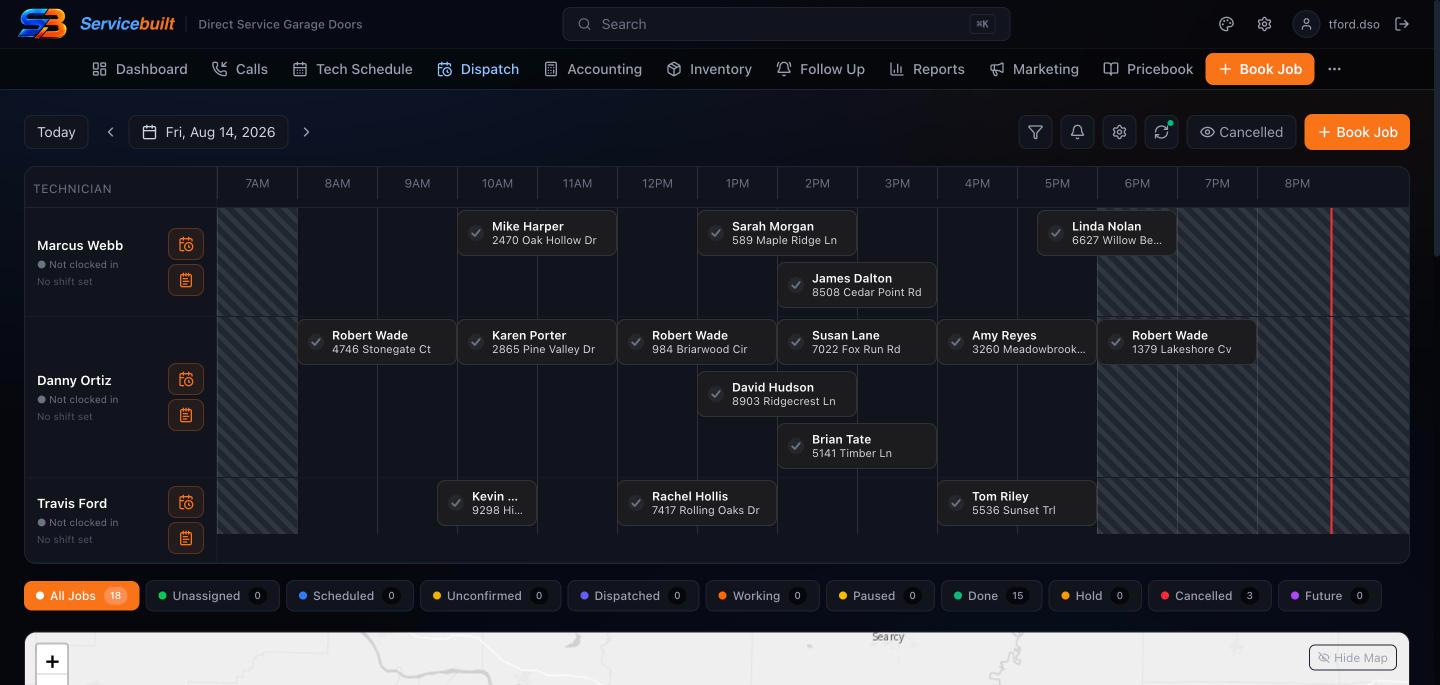
ServiceBuilt desktop dispatch board with three technicians' garage door jobs laid out on a timeline.
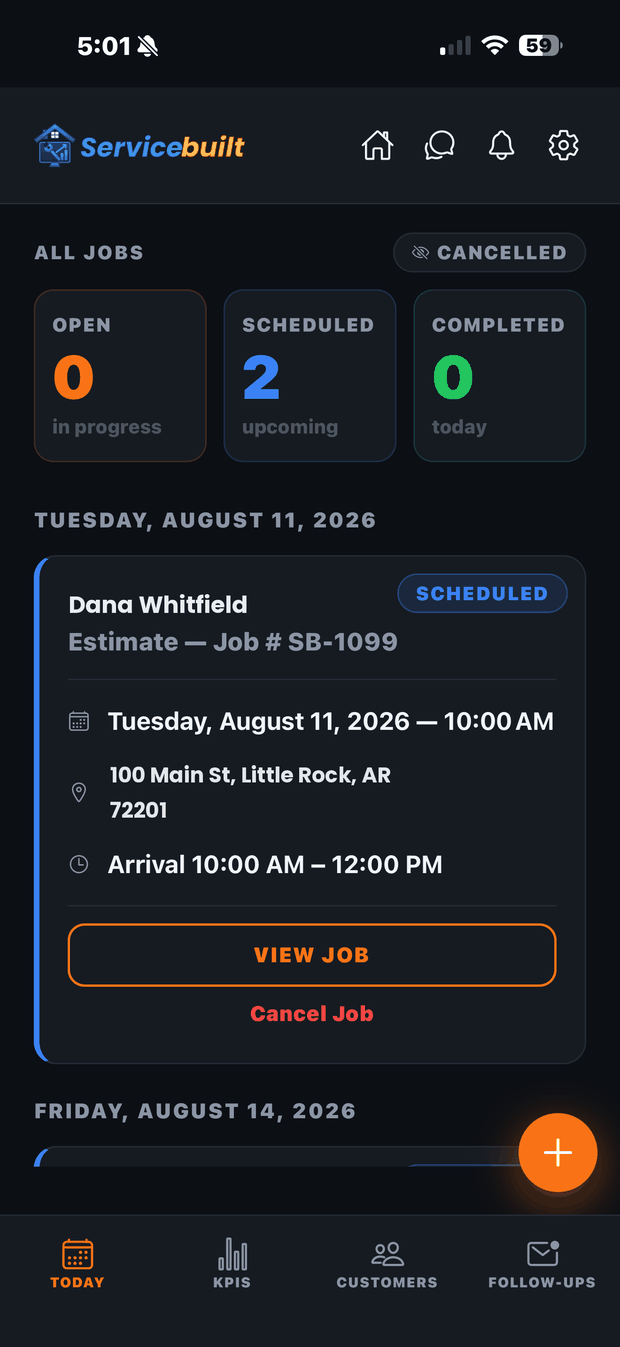
The ServiceBuilt field app on a phone, showing a technician's scheduled jobs for the day.
Real screens. Customer names changed.
1,500+
Reviews at 4.9 stars on the shop that built it
22,000
Jobs migrated in the first move, reconciled line by line
$0
Migration fee, on either plan, forever
0%
Of your card sales — you keep your own processor
The short answer

What is garage door software?

Garage door software is field service management software for a garage door company: it books and dispatches spring, opener and door calls, builds estimates, invoices and takes payment in the driveway, tracks the parts on each truck, and pays technicians their commission. It replaces the whiteboard, the paper tickets and the spreadsheet with one system the office and every truck share.

A lot of what is sold as garage door business software is general field service software set up for doors. ServiceBuilt is different because a garage door company built it.

Built for garage door work

The jobs a garage door company actually runs, start to paid.

Broken springs at 7am, opener swaps, rebuild packages, and full garage door sales with a manufacturer lead time in the middle. Here is what each one looks like in ServiceBuilt.

Dispatch

Garage door dispatch & scheduling

The spring call is booked onto a map board with a real arrival window — by your CSR, or by Riley at 9pm — matched to the customer's history before anybody says hello. A tech can only hold one active job, so "free" on the board means free.

Garage door dispatch software →
Close-up of the ServiceBuilt dispatch timeline.
Estimates

Estimates approved by text

Standard spring, high-cycle upgrade, or high-cycle with cables, rollers and a tune-up — three priced options on the tech's screen. The estimate goes out by text, gets approved on a phone, and unsold quotes get followed up on their own.

Garage door estimating software →
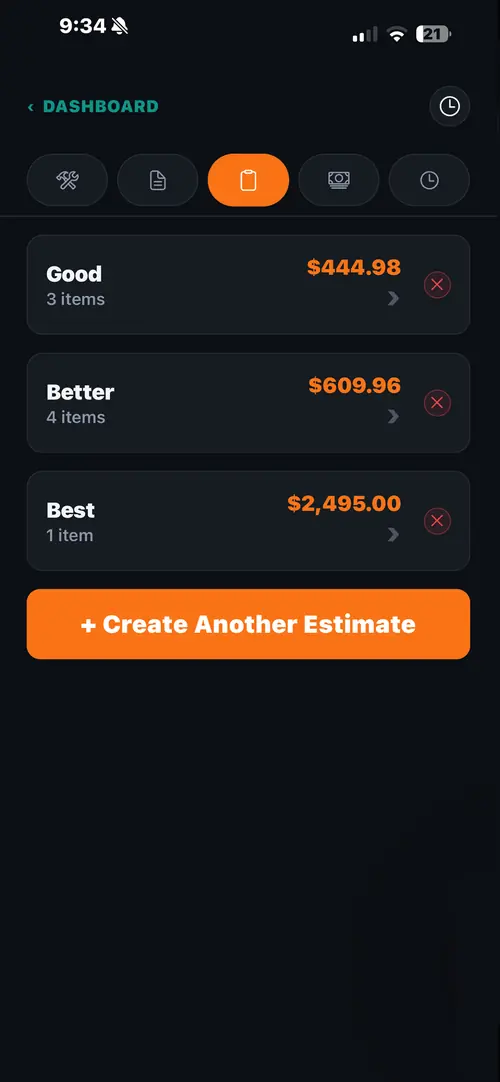
Good, better and best options on a ServiceBuilt estimate.
Door sales

Garage door sales & the Install Board

The order runs separately from the job. Nobody schedules a crew for a door still on a truck from the manufacturer.

Follow a door sale from quote to install →
Get paid

Invoices that close themselves

Card in the driveway or a pay link by text, straight into your own Square account.

Garage door invoicing software →
Payroll

Commission, hourly or salary

Set a company default and override any one man. Spring and cable cost comes off before the percentage on a rebuild.

How commission on profit works →
Inventory

Inventory & truck stock

Invoice the job and the parts come off the tech's truck first, then the shop — including the springs, cables and rollers inside a rebuild package. Weekly truck counts flag what doesn't match, and a daily alert warns you before a tech runs low.

Garage door inventory software →
Customers

Customer history & CRM

Every job, invoice and photo on the customer record, plus memberships and recurring work — the customers you already own.

Customer history and CRM →

Walk through a broken spring call, start to paid →

The desktop office

The app runs the truck. The desktop runs the business.

Dispatch, phones, marketing, money, payroll and parts — the office side is where ServiceBuilt does the heavy lifting, and where Riley drops the jobs she schedules.

ServiceBuilt dispatch board: three technicians' days laid out on a timeline with eighteen garage door jobs.

Every truck's day on one board.

Drag a job to reschedule it, see the map below, and the customer gets an on-the-way text when the job is dispatched.

  • Timeline by technician, with shifts and time off
  • Status filters — unscheduled, working, done, on hold
  • Jobs Riley schedules land here on their own
Dispatch software →
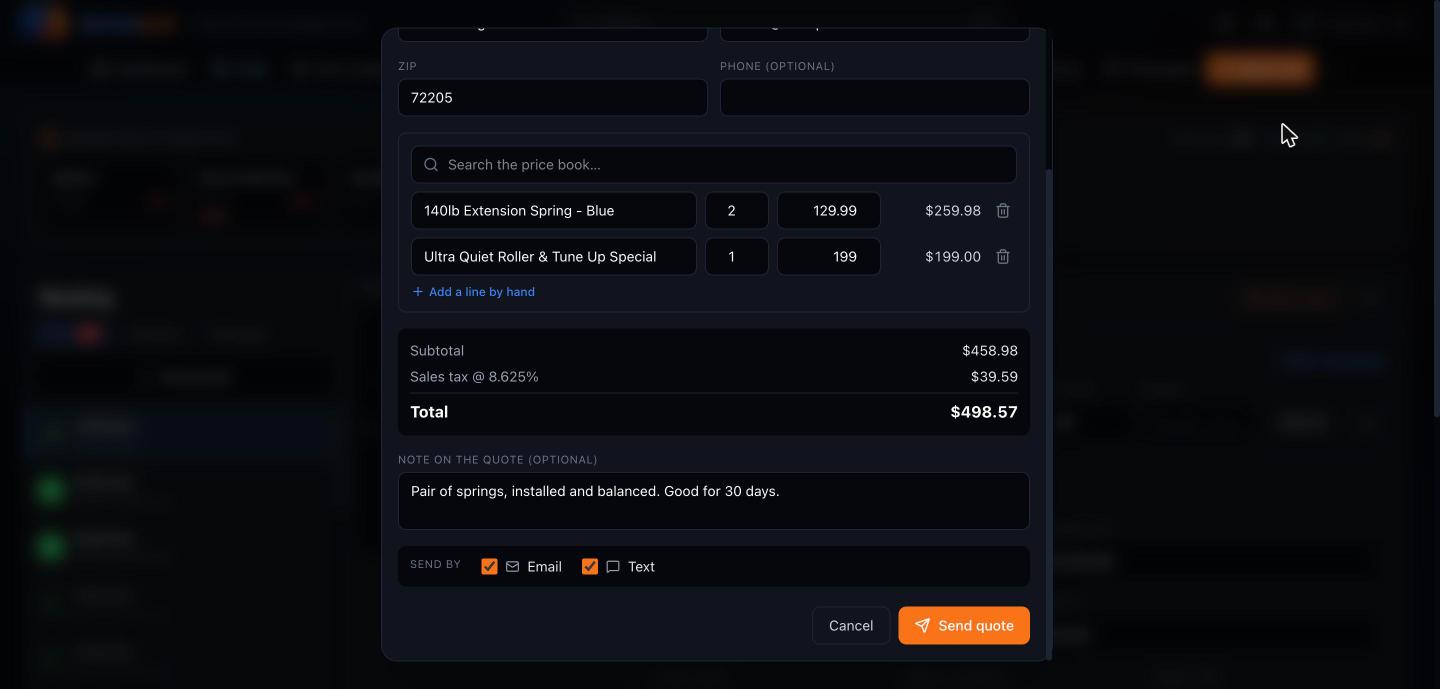
Quick Quote window pricing two extension springs and a roller tune-up with sales tax by ZIP code, sent by email and text.

Quick Quote for price shoppers.

The CSR prices it from the price book while the caller is on the line and emails or texts it — no job, no customer record cluttering the board.

  • Search the price book or type a line by hand
  • Sales tax worked out from the caller's ZIP
  • Send by email, text, or both
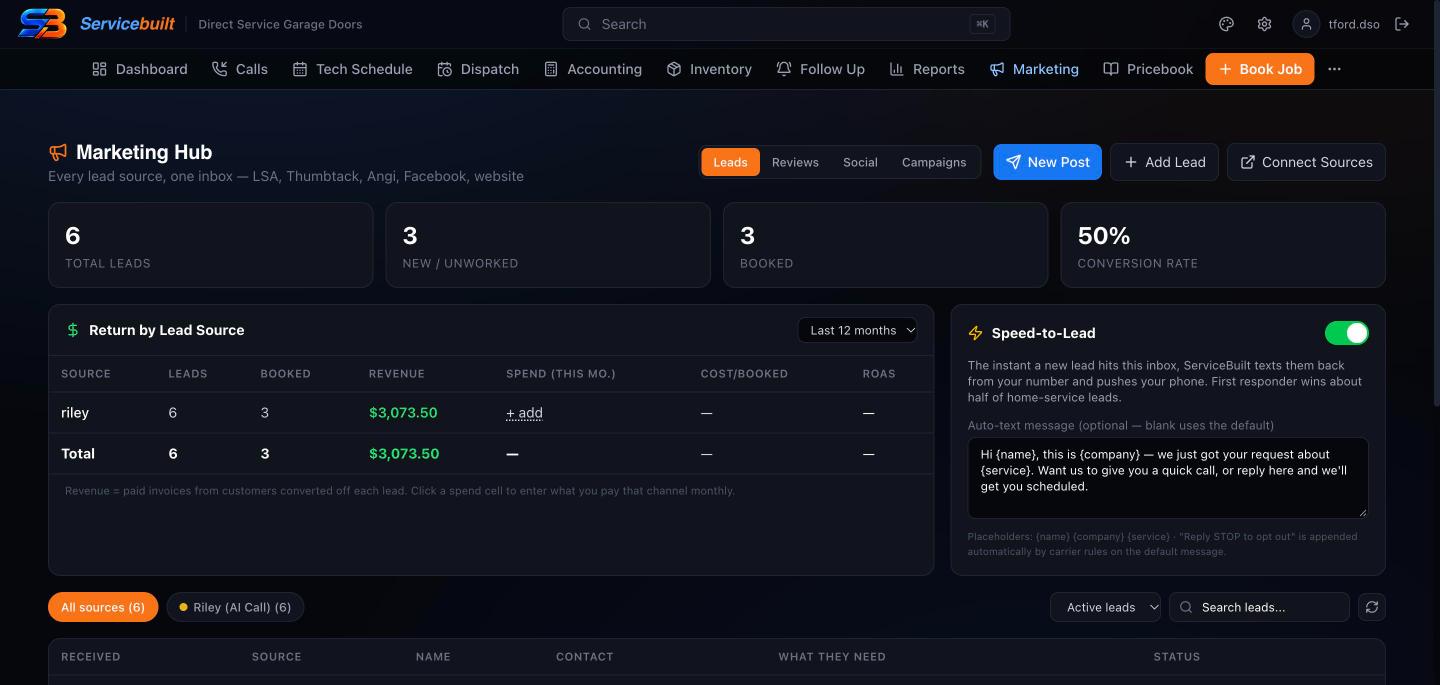
Marketing hub showing total leads, conversion rate, return by lead source and the speed-to-lead auto-text.

Know which dollar booked the job.

Every lead source in one inbox, an instant text back to new leads, and revenue and cost per booked job by source.

  • Leads from Google LSA, Thumbtack, Angi, Facebook, your site and Riley
  • Speed-to-lead text from your own number
  • Reviews, social posts and win-back campaigns
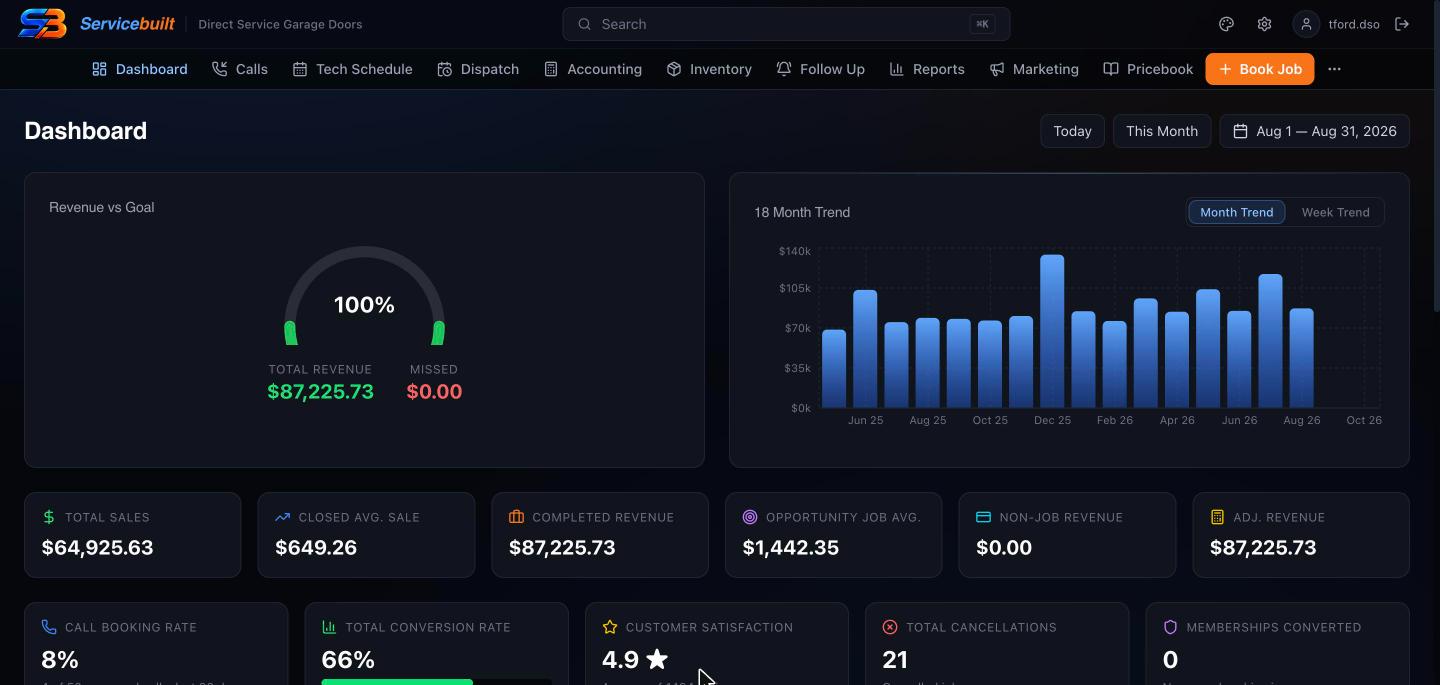
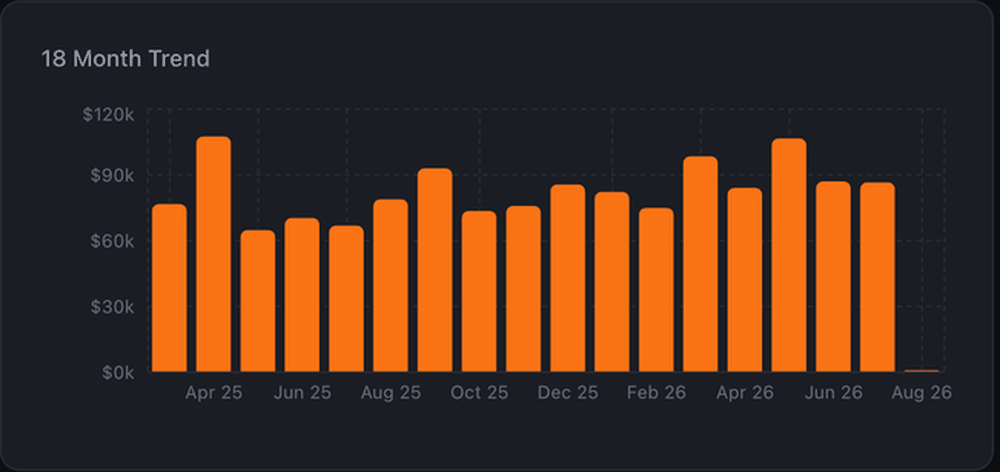
Owner dashboard with revenue against goal, an eighteen-month revenue trend and sales, average ticket and conversion figures.

The month, counted the same day.

Revenue against goal, eighteen months of trend, average ticket, booking and conversion rate. Nothing syncs overnight and nothing gets re-keyed.

  • Revenue goal tracking
  • Average ticket and conversion by tech
  • The full reports shelf behind it
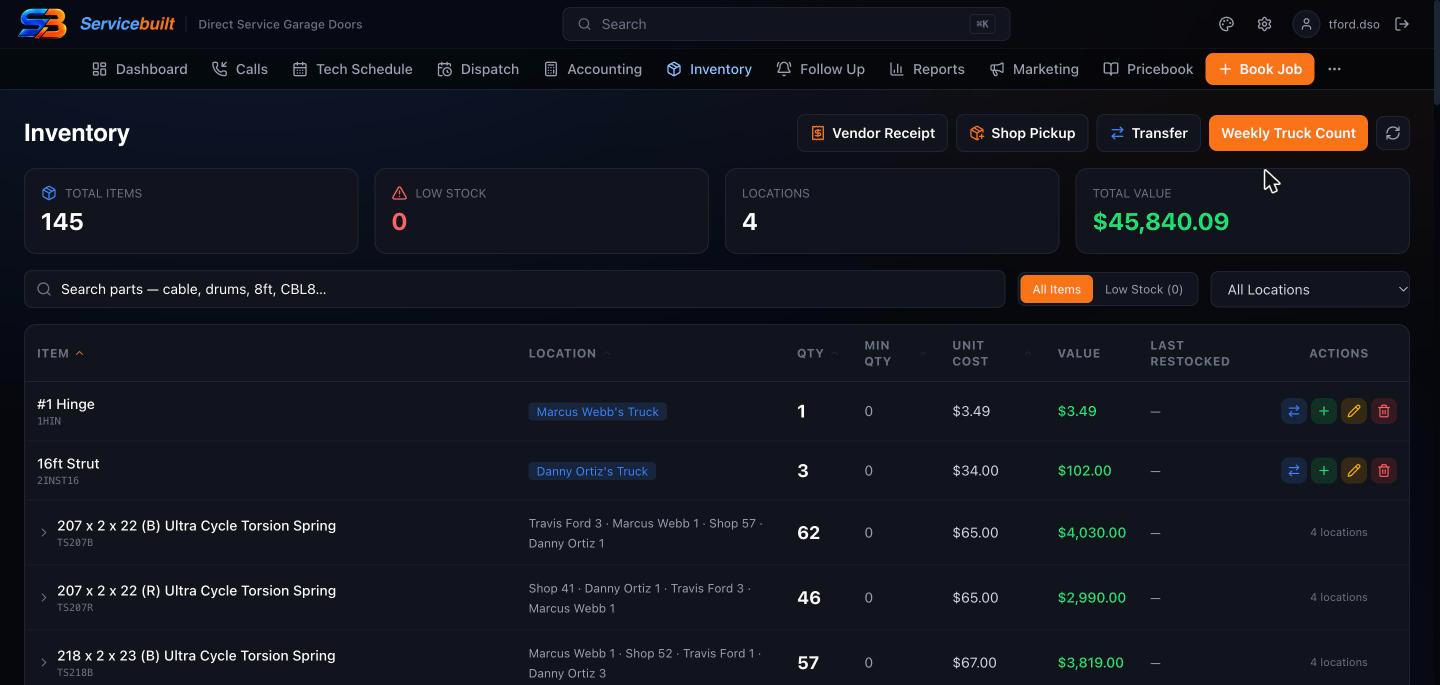
Inventory screen listing torsion springs and parts by truck and shop location with quantities and value.

Every spring, on every truck.

Stock by truck and shop with total value, vendor receipts, shop pickups and weekly truck counts.

  • Parts come off when the job is invoiced
  • Transfers between trucks and the shop
  • Low-stock alerts before a tech runs out
Inventory software →
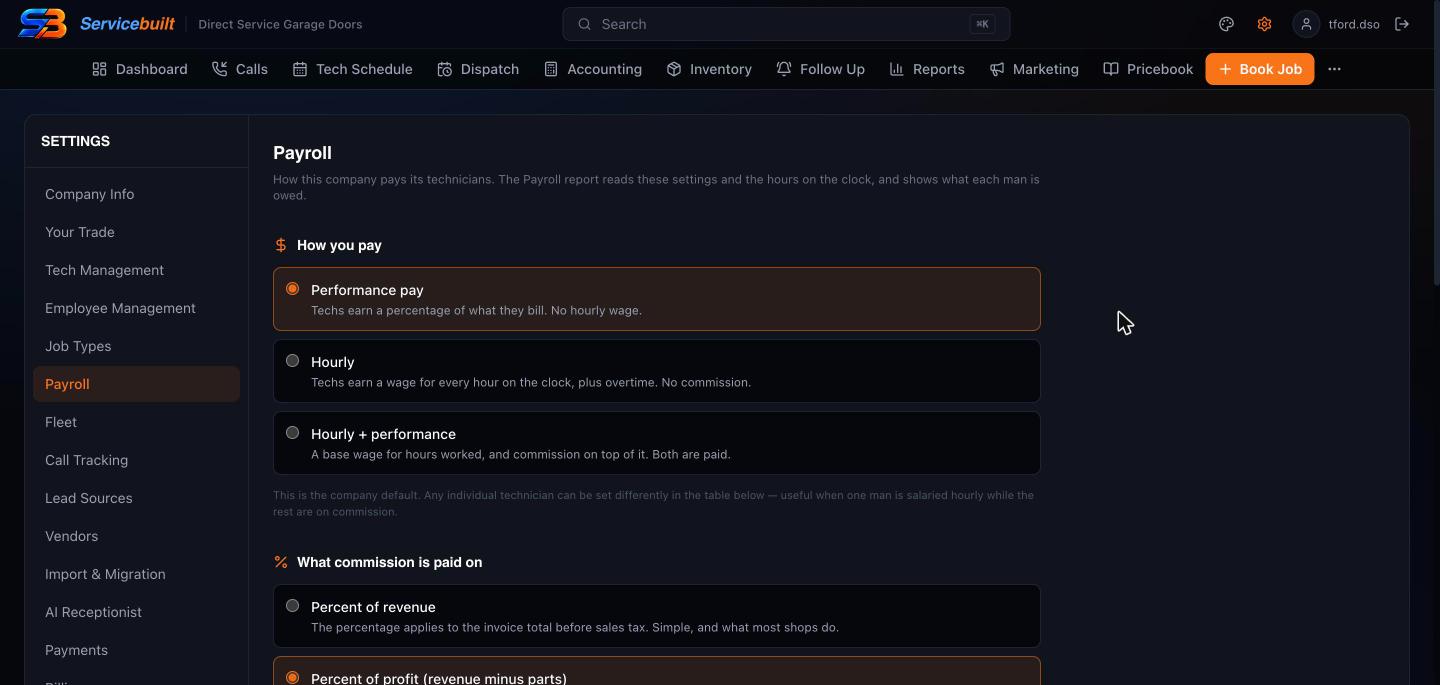
Payroll settings with performance pay, hourly and hourly plus performance options, and commission on revenue or profit.

Pay techs the way you actually pay them.

Performance, hourly, hourly plus commission, or salary per tech — with commission on revenue or on profit.

  • Overtime rules and any pay period
  • Timesheets punched on the phone
  • Office approves and locks the period
Payroll software →
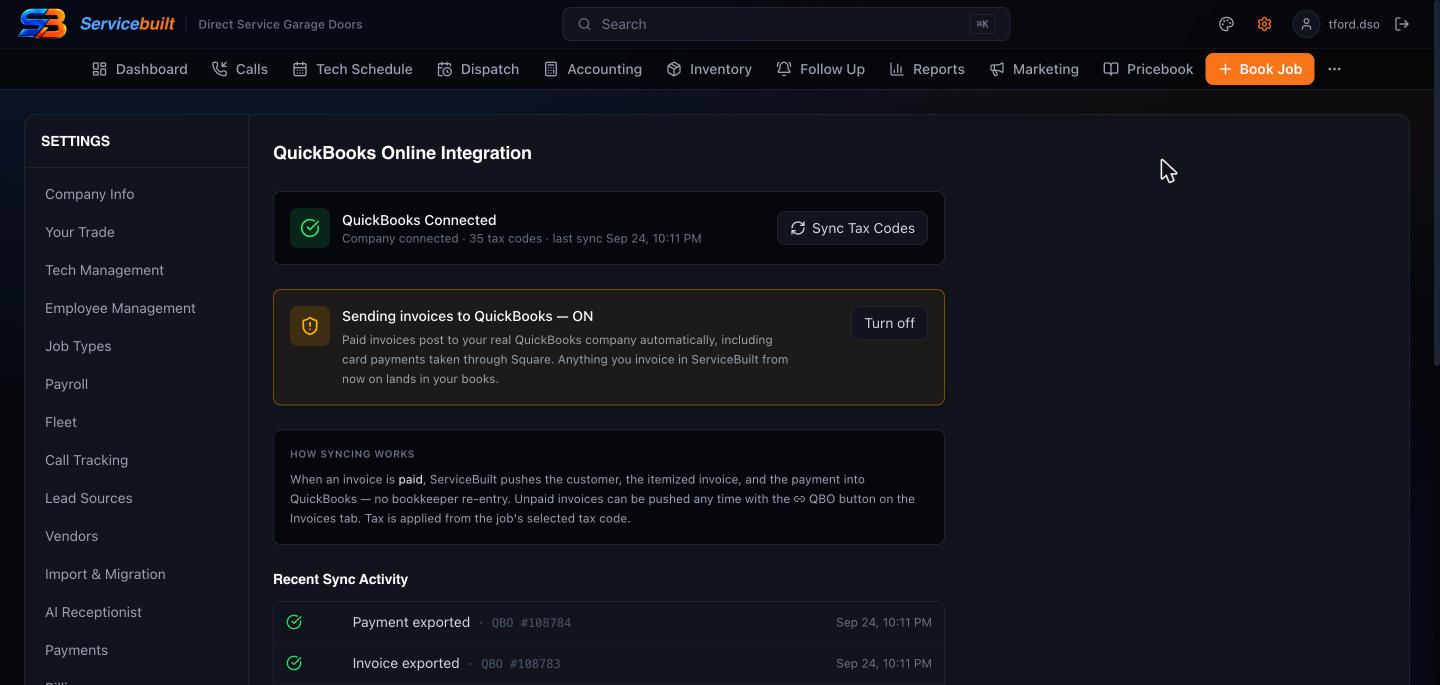
QuickBooks Online settings showing the connection, tax code sync and paid invoices posting to QuickBooks automatically.

QuickBooks Online, both directions.

History and tax codes come in. When an invoice is paid, the customer, the itemized invoice and the payment post back on their own.

  • One-click import of customers, invoices and payments
  • Tax code sync
  • Nothing re-keyed at tax time

Real screens from a working garage door shop. Customer and employee names changed.

AI receptionist

Riley answers the 9pm broken-spring call — and schedules the job.

Every missed call is a car stuck in a garage and a job somebody else got. Riley doesn't take a message. She puts the job on your dispatch board, in a slot you actually have. Included in Powerhouse — not a monthly add-on, which is what it costs on the platforms that offer one at all.

  • She knows who is calling. Matched to your customer book before she says a word — name, address, last job, and whether they owe you money.
  • She schedules the job. A real appointment on the board with the arrival window the customer agreed to — not a callback note.
  • Every call is recorded and read. Recording, transcript, summary and a lead score on every call, including the ones a person answered.

Call tracking comes with it. Put a different number on the truck wrap, the yard sign and the website, and revenue is attributed to the one that earned it — instead of guessing which half of the budget worked.

On the iPhone app

What your techs actually see in the truck.

Straight from the App Store listing. One app for the tech in the driveway and the owner checking in from the shop.

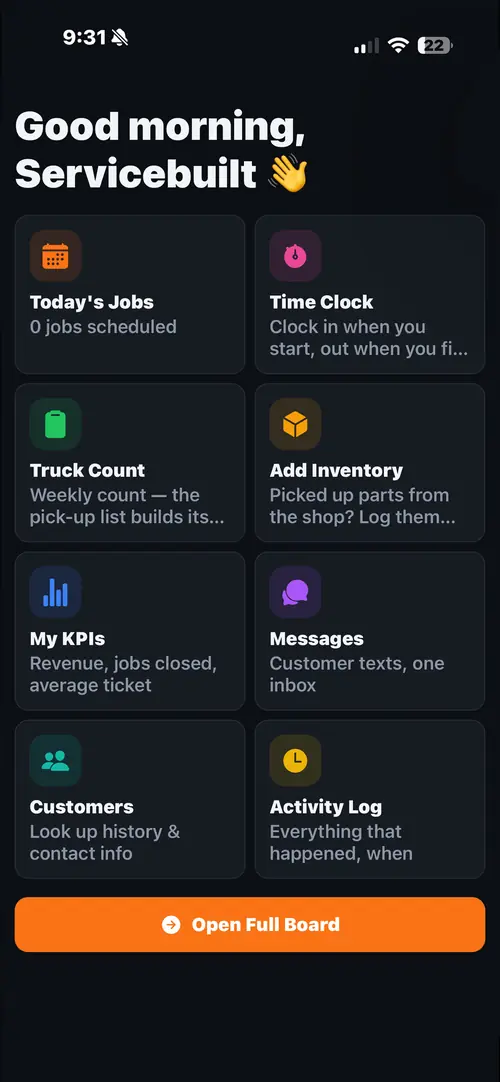
ServiceBuilt iPhone app home screen with today's jobs, time clock, truck count, add inventory, KPIs and messages.
The tech's home screen. Today's jobs, time clock and the weekly truck count, one tap each.
ServiceBuilt estimate screen showing Good, Better and Best options priced $444.98, $609.96 and $2,495.00.
Good, better, best. Three priced options on one estimate, built in the driveway.
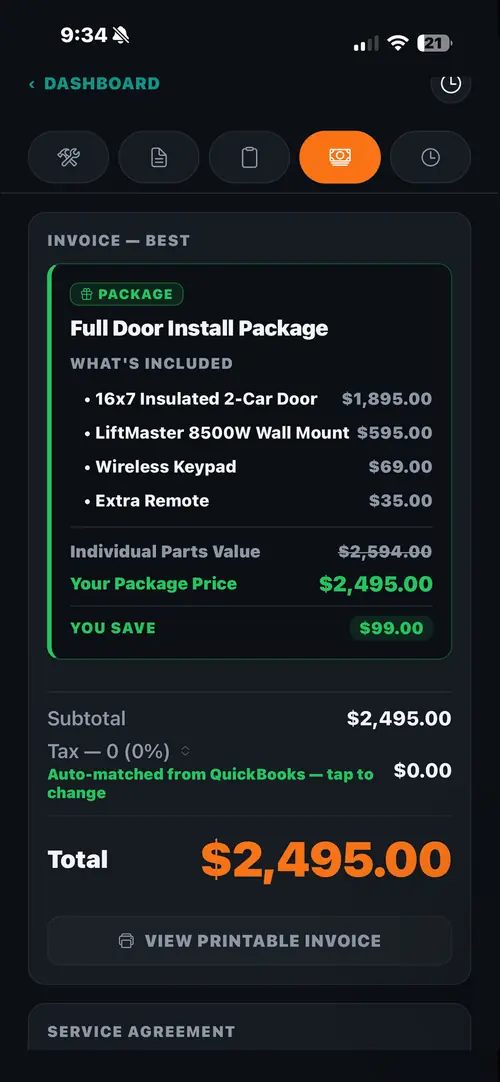
ServiceBuilt invoice for a Full Door Install Package listing the door, opener, keypad and remote, with the package savings.
Packages that sell themselves. Every part inside, the bundle price, and what the customer saves.
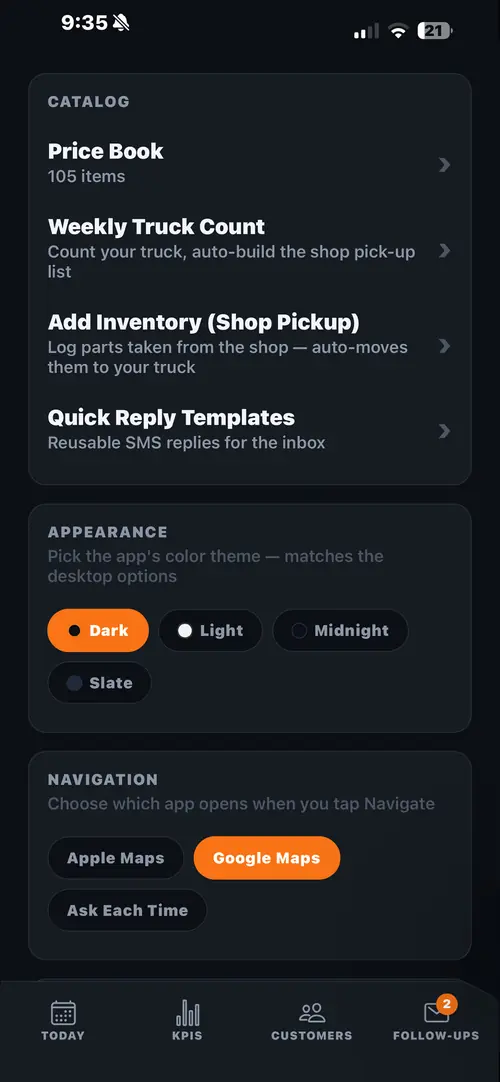
ServiceBuilt catalog screen with the price book, weekly truck count and shop pickup inventory.
Truck stock, counted. Price book, weekly truck count and shop pickups in one place.

See ServiceBuilt on the App Store →

From one garage door guy to another

Most field service software is built for every trade at once. Garage doors get whatever is left over.

It shows. The board fights you on a Saturday spring call. The price book has no idea what a high-cycle upgrade is. The door you sold six weeks ago disappears somewhere between the quote and the manufacturer. And commission gets paid on revenue, so the springs and cables on every rebuild get a percentage too.

Travis Ford, founder of ServiceBuilt and owner of Direct Service Overhead in Little Rock
Travis FordFounder · Owner, Direct Service Overhead
"I built ServiceBuilt because the software I was paying for was never built for how a garage door company actually runs."

I'm Travis Ford. Twenty years in garage doors, and I have run Direct Service Overhead in Little Rock since 2014 — more than 1,500 Google reviews at 4.9. It was built inside my shop, on our real customers, jobs and books, and every change gets tested on our own jobs before it reaches yours.

20 years in the trade1,500+ reviews at 4.9Little Rock, AR

Questions before you sign up? Text me at (501) 209-3855 or call.

Invoicing & payments

Your merchant account. Your rate. We never touch it.

Most platforms put themselves between you and your money, take a slice of every swipe, and hold the deposit for a few days on the way through. We connect to an account that belongs to you.

Square, built in — your account, your rate

You connect the Square account you already take payments on. The rate you have with Square is the rate you pay. ServiceBuilt takes no percentage of your card volume, adds no markup, and never becomes the merchant of record on your sales.

Money lands in your bank, not ours

Deposits go from Square straight to your bank on your existing Square schedule — next business day, free, for cards run before 8pm ET. We are not in the settlement path, so there is nothing for us to delay.

Tap to Pay on iPhone — no reader to buy

A technician takes a tap or a contactless card on the iPhone already in their pocket. No dongle, no Bluetooth reader, no hardware to order and nothing to lose out of a truck. It runs through Square Point of Sale on the same phone, so the money lands in your Square account like every other sale and the invoice closes itself back in ServiceBuilt.

Text the customer a link

For the ones who are not home, who need to ask a spouse, or who will never open an email. The invoice goes out by text, they pay on their phone, and the job closes itself.

The office half

And the same day, counted.

Nothing syncs overnight and nothing gets re-keyed. The invoice a technician closes in the driveway is in the month's numbers before he is back in the van.

More on our garage door invoicing software →

Eighteen months of monthly revenue as a bar chart in the ServiceBuilt dashboard.
Eighteen months of revenue from Direct Service Overhead's own books, in the ServiceBuilt dashboard — not a demo account.
Everything in the box

What ServiceBuilt actually does.

One price, unlimited techs. Here is the whole list.

Phones & booking

  • Riley, the AI receptionist — answers nights and weekends or every call, schedules the job right onto the dispatch board, transfers live to a person
  • Every call recorded, transcribed, summarized and lead-scored
  • Tracking numbers per source, spam call screening
  • Quick Quote — email or text a caller a taxed price without booking
  • Two-way text inbox with suggested replies
  • Online booking widget with ZIP coverage check

Dispatch & scheduling

  • Drag-and-drop dispatch board with map
  • Tech shifts — scheduled, on call, time off
  • On-the-way texts and a customer job-page link
  • Install Board — door orders tracked not ordered, ordered, arrived
  • Forms builder and on-site findings

Sales & follow-up

  • Good / better / best estimates approved by text
  • Unsold estimates chased automatically on day 2 and day 7
  • Packages that list every part and the customer's savings
  • Memberships with auto-pay, renewal reminders and recurring service

Marketing hub

  • One leads inbox — Google LSA, Thumbtack, Angi, Facebook & Instagram, website, Riley
  • Speed-to-lead: new leads get a text from your number in seconds
  • Revenue, cost per booked job and ROAS by lead source
  • Google review replies drafted by AI, review-request campaigns
  • Social posts to Facebook, Instagram and Google
  • Win-back and anniversary text and email campaigns

Money & books

  • Square built in — pay-by-text links, office card charges, deposits, refunds
  • QuickBooks Online — history in, paid invoices out
  • A/R aging, statements, a daily collections call list
  • Batch export, bank deposits, audit trail, sales tax by ZIP

Payroll & team

  • Commission, hourly, hourly plus commission, or salary
  • Commission on revenue or on profit
  • Overtime rules and any pay period
  • Timesheets techs punch on the phone; office approves and locks
  • Page-by-page permissions per employee

Inventory

  • Stock on every truck and in the shop
  • Parts come off when the job is invoiced — packages too
  • Transfers, shop pickups, vendor receipts
  • Weekly truck counts and low-stock alerts

Reports

  • Job costing and payroll
  • A/R and unpaid invoices
  • Marketing ROI
  • Inventory value and movement
  • Tax detail — accrual or cash

Moving in

  • ServiceTitan direct import
  • Housecall Pro, Jobber and QuickBooks exports mapped for you
  • Duplicate cleanup, and undo for 30 days
  • Free, and we do it
Migration

Off ServiceTitan, Housecall Pro or Jobber. Free, and we do the moving.

The reason shops stay on software they hate is the thought of retyping their whole customer book. You do not retype anything.

22,000jobs moved in our own migration
24,000customers, every invoice attached
$0migration fee, ever
Everything

Not just names and numbers

Customers, every job with its real schedule and technician, estimates, invoices, payments, price book, shifts and forms — job history arriving attached to the customer it belongs to, the way you left it.

$0

No migration fee, ever

Not a launch promotion, not an onboarding package, not a "data services" line on your first invoice. Charging a shop to hand over its own records is a toll booth, not a service.

Live

Run both at once

Keep your old system running while you try this one. Nothing gets switched off on our say-so, and if you walk away in week three you have lost a month of nothing.

This is not a theory. The first migration was our own — a full ServiceTitan book of twenty-two thousand jobs and twenty-four thousand customers, with every invoice attached, moved across and reconciled line by line against the source.

Which is also why we tell you what did not come across. An import that quietly drops data is worse than no import, so you see the report of what was skipped, and why, before anything goes live.

Talk to the guy who built itQuestions? Text Travis, not a sales team.
A fair comparison

ServiceBuilt vs generic field service software

The platforms garage door shops usually look at are built for many trades and priced in many ways. This is the short version; named platforms and their published prices are on the full comparison page.

"Typical" is a generalisation — individual products differ, so check any vendor's current terms before deciding.
What mattersServiceBuiltTypical field service software
Built by a garage door companyYesUsually built for many trades
Price published on the siteYesVaries — some ask you to book a demo
Unlimited technicians at a flat priceYesUsually priced per user
Keep your own Square account (0% of card sales)YesVaries
Free migration, done for youYesVaries
No contractYesVaries
Pricing

How much does garage door software cost?

ServiceBuilt costs $149 a month for Workhorse, the mobile app with unlimited technicians, or $448 a month for Powerhouse, which adds the desktop office — dispatch board, AI receptionist, call tracking, accounting and A/R, commission payroll, inventory and reports. The first fifteen garage door shops get Powerhouse at $149 a month, locked for life.

Most garage door software asks you to book a demo before you see a price. Ours is right here, and the comparison page lists the published prices we could find for the others.

No contracts. Ever. Month to month, cancel yourself in the app. No card to start, no demo call, no salesperson.

Two plans, one price list

Because your software shouldn’t cost more than your truck note.

Pay for the half you use and add the other half whenever. Some shops are one truck and a phone. Some have an office, a dispatcher and a bookkeeper. Moving between the two takes one click and takes effect the same day. Both plans are month to month — there is no contract to sign and no term to get out of.

Workhorse

One to three trucks. The phone is the whole business.

$149 / month
  • The full mobile app, unlimited technicians
  • Jobs, scheduling and your day at a glance
  • Estimates a customer approves by text
  • Invoices, card payments and pay-by-text links
  • Tap to Pay on iPhone — no reader to buy
  • Customers, job history and photos
  • Price book with good / better / best
  • Time clock and review requests
Start free

Everything a technician touches. If nobody in your shop sits at a desk, this is the whole product.

Most shops

Powerhouse

You have an office — or you want one that runs itself.

$448 / month
  • Everything in Workhorse, plus:
  • Dispatch board with map and drag scheduling
  • AI receptionist that answers and schedules the job
  • Marketing hub, call tracking and ROI attribution
  • Accounting, A/R and batch invoicing
  • Price book management and good / better / best
  • Payroll — commission, hourly or salary — and timesheets
  • Quick Quote for price-shopper calls
  • The full reports shelf
  • Memberships, install board and forms builder
  • Shop and truck inventory with weekly truck counts
Start free

The office half is where the money leaks get found — uncosted parts, unbilled work, ads that never paid for themselves.

The Founding 15

The first fifteen shops get Powerhouse in full — the office, the AI agent, all of it — at the Workhorse price, locked for life. Not for a year. The price never moves, whatever the public price does.

How the founding seat works →

$448$149/mo, forever
Upgrading

Starting small costs you nothing later.

Adding the office changes the price on the subscription you already have — it does not start a second one. You are invoiced the prorated difference immediately, so there is no surprise bill four weeks later, and nothing to re-enter.

What you getWorkhorsePowerhouse
Mobile app, unlimited techniciansIncludedIncluded
Estimates, invoices, card paymentsIncludedIncluded
Tap to Pay on iPhone & card readersIncludedIncluded
Customer history, photos, price bookIncludedIncluded
Time clock & review requestsIncludedIncluded
Free migration from your old systemIncludedIncluded
Desktop dispatch board with map—Included
AI receptionist that schedules the job—Included
Call tracking & marketing attribution—Included
Accounting, A/R, batch invoicing—Included
Payroll (commission, hourly, salary) & timesheets—Included
Memberships & forms builder—Included
Shop & truck inventory, truck counts—Included
Your data

Full control means you can leave.

Software that is hard to leave does not have to stay good. We would rather earn the month.

No contract and no term

Month to month. Cancel from inside the app — not by scheduling a call with someone whose job is talking you out of it.

Your records stay readable

If a subscription lapses, the app stops letting you create new work. It does not lock you out of what you already entered — customers, invoices and job history stay open to read and export. Holding a shop's own records hostage is not a collections strategy.

Your customer list cannot walk out

Caller ID works on a technician's phone without writing a single customer into the device's address book. Hand a company phone to the next hire and no customer list leaves with the last one.

QuickBooks Online, both directions

Your customers, invoices and payment history come in from QuickBooks, and your tax codes sync from it. When an invoice is paid, ServiceBuilt posts the customer, the itemized invoice and the payment back into QuickBooks on its own — your accountant keeps working the way they already do and nothing is re-keyed at tax time.

Getting started

Thirty days, no card, no contract, and we do the setup.

  1. Sign up — no card, no call, no demo to sit through

    Thirty days of everything, including the office half and the AI agent. Nothing to cancel if you walk away.

  2. Send us your export and we migrate it

    Customers, jobs, estimates, invoices, payments, price book. You review what came across — and what didn't — before anything goes live.

  3. Connect your Square account

    Your account, your rate. About two minutes, and a technician can take a card on a truck the same afternoon.

  4. Run both systems for a couple of weeks

    Nothing is switched off on our say-so. Move when your crew stops asking which one to open.

  5. Pick a plan when the trial ends

    Workhorse if it is you and a truck, Powerhouse if you have an office. Change your mind later and it is one click.

Straight answers

The questions shops actually ask about garage door company software.

Still stuck on one? Text Travis — he answers.

Is ServiceBuilt really built for garage door companies?

Yes. Garage doors are the trade it came out of. Spring and opener calls, garage door sales with a manufacturer lead time in the middle, good, better and best on a rebuild, commission on profit instead of revenue — that is the day it was designed around.

It was built for garage door shops, by a garage door shop, and that is who it is for.

What is the best software for a garage door company?

It depends on the size of the shop. A one-truck operation can get by on a simple, inexpensive general app, and a large multi-location company may want an enterprise platform with an implementation team behind it.

For the shops in between — roughly one to twenty trucks — we built ServiceBuilt, because the software we were paying for was never built around spring calls, good, better and best, door orders with a manufacturer lead time, and commission on profit. The fair test is your own jobs: run it for 30 days next to what you have now.

How much does garage door software cost?

ServiceBuilt is $149 a month for Workhorse, the mobile app with unlimited technicians, or $448 a month for Powerhouse, which adds the desktop office. The first fifteen shops get Powerhouse at $149 a month, locked for life.

Many vendors ask you to book a demo before they show a price. Our comparison page lists the published prices we could find.

Is ServiceBuilt a Housecall Pro or Jobber alternative for garage door companies?

Yes. It covers the same core work — scheduling, estimates, invoicing and payments — but at one flat price with unlimited technicians instead of per-user pricing, and it was built inside a garage door company rather than for many trades at once.

To be fair, below about ten people their published prices can come out lower than our Powerhouse plan. The Housecall Pro and Jobber pages show the math line by line.

Does it work on iPhone and Android?

The ServiceBuilt field app is on the App Store for iPhone now. There is no Android app yet. The office side — dispatch board, accounting and reports — runs in a web browser on any computer.

I am on ServiceTitan with a contract. Can I still try it?

Yes. Run both side by side for the trial. We migrate your history free, so you see your own customers and jobs in ServiceBuilt well before your renewal date. Nothing here depends on cancelling anything first.

What happens when the trial ends and I have not paid?

You get a few days past the date before anything changes — nobody gets cut off with a technician standing in a customer's driveway. After that the app stops letting you create new jobs, invoices and payments.

It does not lock you out of your own records. Everything you entered stays readable and exportable for as long as the account exists. Pay and it all comes back on, exactly where you left it.

Do you take a percentage of my credit card sales?

No. You connect your own Square account and pay whatever rate you have with Square. We add nothing, we are not the merchant of record, and deposits never pass through us.

What does the migration actually cost?

Nothing, on either plan. Not a setup fee, not an onboarding package, not a line on your first invoice.

Does ServiceBuilt work with QuickBooks?

Yes, QuickBooks Online, in both directions. Your customers, invoices and payment history come in from QuickBooks with a one-click import, and your tax codes sync from it. Going the other way, when an invoice is paid ServiceBuilt posts the customer, the itemized invoice and the payment into QuickBooks automatically, so nobody re-keys anything. It is a switch you turn on when you are ready.

Can I start on Workhorse and add the office later?

Yes, and that is the normal path. Upgrading changes the price on the subscription you already have — you are invoiced the prorated difference right then, so there is no surprise charge a month later. The office half turns on immediately with all your existing data already in it.

How is this different from ServiceTitan, Housecall Pro or Jobber?

Price is the obvious one: this is a flat monthly number with unlimited technicians, no per-seat math, no implementation fee and no annual contract to sign. Migration is free on either plan and we do the moving ourselves.

The less obvious one is who it answers to. This was written by a garage door contractor for his own crew, so the defaults are the ones a door shop actually wants. You also keep your own Square account at your own rate — we take no percentage of your card sales and never become the merchant of record.

What you give up is the size of those companies: a decade-old partner marketplace, a big-city implementation team, a conference. If that infrastructure is what you are buying, buy it — we would rather tell you that than lose you at month four.

Is there a contract?

No term, no minimum, month to month. Cancel in the app.

How many users do I get?

Unlimited, on both plans. Per-seat pricing punishes you for hiring, and a shop that has to think about whether a new technician is worth a license is being charged for growing.

Do I have to use the AI phone agent?

No. It is off until you turn it on, and you choose whether it answers everything, only nights and weekends, or nothing at all.

Does it track inventory on the trucks?

Yes, on Powerhouse. Stock is tracked in the shop and on every truck, per tech. Parts come off the tech's truck automatically when the job is invoiced — truck first, then the shop, including the parts inside a package like a rebuild — and go back on the shelf if the job is cancelled. Weekly truck counts flag what does not match, and a daily alert warns you before a tech runs out of springs, cables, rollers or openers.

Who built this, and does he actually run a shop?

Travis Ford, who has spent twenty years in the garage door trade and has run Direct Service Overhead in Little Rock, Arkansas since 2014 — more than 1,500 reviews at 4.9 stars. ServiceBuilt was built inside that company, on its real customers, jobs and books, and changes are tested on its own work before they reach anyone else.

Thirty days. No contract. Your data moved for you.

If it is not better than what you have by the end of the month, you have lost nothing but a month of your old software still running in the other tab.

The Founding 15: the first fifteen shops get Powerhouse at $149 a month, locked for life. Once they're gone, they're gone.

No contract · Cancel in the app · Unlimited technicians